
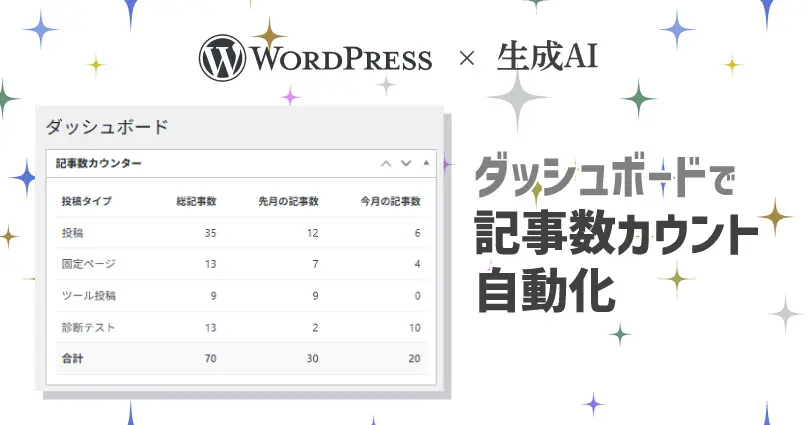
ブログを運営している皆さん、毎月の投稿記事数、どうやってカウントしていますか?
「今月何記事書いたかな?」と手帳やカレンダーで確認するのも、記事が増えてくると結構な手間ですよね。私もその一人で、手動でのカウントが面倒になってきました。
そこで、この作業を自動化できないかと思い、生成AIのGeminiに相談。WordPressのダッシュボードにオリジナルの「記事数カウンター」ウィジェットを追加してもらうことにしました。
この記事では、その作成過程とコピペで使えるコードを共有します。
作成ログ
完成までの作成時間:5約分
完成までのチャットでのやり取り回数:1回
Geminiに指示したプロンプト
WordPressのダッシュボードで、記事数、今月の記事数、先月の記事投稿数をカウントしたい

カウントは投稿・個別ページ、カスタム投稿ページバラバラでカウントしたい

全部の合計数もカウントしたい
実装方法
- ファイルのバックアップ: 何か問題があった場合に備え、作業前に
functions.phpファイルのバックアップを取っておくことをお勧めします。 - コードの追加:
- WordPressの管理画面から「外観」>「テーマファイルエディター」に進みます。
- 右側のファイル一覧から「テーマのための関数 (functions.php)」を選択します。
- エディターの一番下に、上記のコードを貼り付けます。
- 「ファイルを更新」ボタンを押します。
- 確認:
- ダッシュボード(管理画面のトップページ)に戻ります。
- 「記事数カウンター」というウィジェットが表示され、投稿・固定ページ・カスタム投稿タイプごとの記事数が集計されていれば成功です。
このウィジェットは、新しいカスタム投稿タイプを追加した場合でも自動的に認識し、集計対象に含めてくれます。
コード
<?php
/**
 * ダッシュボードに投稿数を集計するウィジェットを追加する
 */
add_action('wp_dashboard_setup', 'my_custom_post_count_widget');

function my_custom_post_count_widget() {
    // 既存のウィジェットがあれば一旦削除して再登録する(コードの重複を防ぐため)
    global $wp_meta_boxes;
    unset($wp_meta_boxes['dashboard']['normal']['core']['my_post_count_widget']);

    wp_add_dashboard_widget(
        'my_post_count_widget',         // ウィジェットのスラッグ(ID)
        '記事数カウンター',               // ウィジェットのタイトル
        'my_post_count_widget_display'  // 表示用の関数
    );
}

/**
 * ウィジェットの表示内容を生成する関数
 */
function my_post_count_widget_display() {
    // 合計数を初期化
    $total_all_posts = 0;
    $total_month_posts = 0;
    $total_last_month_posts = 0;

    // 公開されているすべての投稿タイプを取得
    $post_types = get_post_types(['public' => true], 'objects');

    // 見やすいようにテーブルで出力
    echo '<style>
            #my_post_count_widget table { width: 100%; border-collapse: collapse; margin-top: 10px; }
            #my_post_count_widget th, #my_post_count_widget td { padding: 10px 8px; text-align: left; border-bottom: 1px solid #eee; }
            #my_post_count_widget th { font-size: 13px; }
            #my_post_count_widget td { font-size: 14px; }
            #my_post_count_widget .total-row td { font-weight: bold; border-top: 2px solid #ddd; background-color: #f9f9f9; }
            #my_post_count_widget .align-right { text-align: right; }
          </style>';

    echo '<table>';
    echo '<tr><th>投稿タイプ</th><th class="align-right">総記事数</th><th class="align-right">先月の記事数</th><th class="align-right">今月の記事数</th></tr>';

    // 各投稿タイプをループ処理
    foreach ($post_types as $post_type) {
        // メディア(attachment)は集計から除外する
        if ($post_type->name === 'attachment') {
            continue;
        }

        // 1. 総記事数を取得
        $count = wp_count_posts($post_type->name);
        $published_count = $count->publish;

        // 2. 先月の記事数を取得
        $last_month_query_args = [
            'post_type'      => $post_type->name,
            'post_status'    => 'publish',
            'posts_per_page' => -1,
            'date_query'     => [
                [
                    'year'  => date('Y', strtotime('-1 month')), // 先月の年
                    'month' => date('m', strtotime('-1 month')), // 先月の月
                ],
            ],
        ];
        $last_month_query = new WP_Query($last_month_query_args);
        $last_month_count = $last_month_query->found_posts;

        // 3. 今月の記事数を取得
        $month_query_args = [
            'post_type'      => $post_type->name,
            'post_status'    => 'publish',
            'posts_per_page' => -1,
            'date_query'     => [
                [
                    'year'  => date('Y'),  // 現在の年
                    'month' => date('m'), // 現在の月
                ],
            ],
        ];
        $month_query = new WP_Query($month_query_args);
        $month_count = $month_query->found_posts;

        wp_reset_postdata(); // クエリをリセット

        // テーブルの行を出力
        echo '<tr>';
        echo '<td>' . esc_html($post_type->label) . '</td>';
        echo '<td class="align-right">' . number_format($published_count) . '</td>';
        echo '<td class="align-right">' . number_format($last_month_count) . '</td>';
        echo '<td class="align-right">' . number_format($month_count) . '</td>';
        echo '</tr>';

        // 合計に加算
        $total_all_posts += $published_count;
        $total_last_month_posts += $last_month_count;
        $total_month_posts += $month_count;
    }

    // 最終行に合計を出力
    echo '<tr class="total-row">';
    echo '<td><strong>合計</strong></td>';
    echo '<td class="align-right"><strong>' . number_format($total_all_posts) . '</strong></td>';
    echo '<td class="align-right"><strong>' . number_format($total_last_month_posts) . '</strong></td>';
    echo '<td class="align-right"><strong>' . number_format($total_month_posts) . '</strong></td>';
    echo '</tr>';

    echo '</table>';
}functions.phpにコードを追加後にダッシュボードに行き画面を更新すると下記の様な「記事数カウンター」が表示されているのが確認できます。
適当にAIに指示した割にイメージ通りの記事数カンターが出来上がりました。

まとめ:AI活用で面倒な作業をサクッと効率化
今回は、WordPressの面倒な集計作業をGeminiに依頼してみました。
最近のAIは非常に優秀です。
最近は面倒なので、よほど複雑なコードを書いてもらわない場合は、プロンプトでよくある「あなたは優秀なエンジニアです。」とか役割指定したり項目に#をつけるとかせず適当に書いちゃうことがあります。最近のAIは数年前より優秀になってきてるので昔よりプロンプトを適当に書いてもかなりちゃんとやってくれます。もちろんちゃんと書いたほうが良いものができるとは思いますが(笑)
今回は小難しいプロンプトエンジニアリングを行わず、要件を箇条書きで投げただけでしたが、イメージ通りのウィジェットが約5分で完成しました。
「ちょっと面倒だな」と感じる作業があれば、まずはAIに相談してみると、意外とあっさり解決策を提示してくれるかもしれません。皆さんもぜひ試してみてください。

